Showing posts with label Banking Tips. Show all posts

Canara Bank Account Balance Enquiry Phone Number (Missed Call)

Posted by on 4/03/2017

Here's how to do canara bank balance enquiry by missed call. Canara Bank is one of the oldest and leading nationalized bank in India. Over the years the Bank has gained trust among customers by providing good customer service and efficient banking schemes. Gone are the days when you have to go in person to the bank or use one of the ATM centers to check bank balance. Now you can check your account balance by just sitting at your home thanks to the rapid growth of Technology.

Net banking is one such way for you to check account balance and do transactions via online. You have to register for the online banking service and then you can login to your account and check balance from anywhere. But the banking sector has introduced the Missed Call Service in which you don't have to use any special app or internet service to check canara bank account balance.

canara-bank-balance-check-by-missed-call
  1. I Want to Check My Account Balance in Canara Bank
  2. Canara Bank Missed Call Balance Check Number
  3. Canara Bank Missed Call Mini Statement Number
  4. Receive Mini Statement by SMS
  5. How to Register Mobile Number in Canara Bank ATM

I Want to Check My Account Balance in Canara Bank

If i want to check my account balance in canara bank the simplest solution is to use canara bank missed call service. To check bank balance, all you need is a mobile phone and to send a missed call to a toll free phone number. And your account balance will be sent within moments via SMS. Here I'm going to share how to check canara bank account balance by missed call.

Canara Bank Missed Call Balance Check Number

Canara Bank missed call balance check number - 09015483483

To check bank balance for Canara Bank's account, give a missed call to this phone number 09015483483. This is the toll free number applicable all over India. Just dial the mobile number and the call will be disconnected automatically after ringing and your account balance will be sent to you through text message shortly.

The SMS service is completely free and you can use it as many times as you want. Please note you can use this service only if you have registered and verified your mobile number with Canara Bank Account.

Canara Bank Missed Call Mini Statement Number

Canara Bank missed call mini statement number - 09015734734.

Canara Bank has also extended its SMS service to receive Mini statement for bank account. To request Mini statement in English, send a missed call to the mobile number 09015734734. You will receive a sms containing the last five transactions of your account.

To receive mini statement in Hindi language, dial 09015613613 to get sms containing the last five transaction details in hindi.

Receive Mini Statement by SMS

Alternatively you can send SMS to request canara bank mini statement.

Just type CANTXN <user_id> <MPIN> and send it to 5607060 number.

Replace <user_id> for your user_id and <MPIN> for your mobile banking PIN number. Shortly your account mini statement details will be sent back via text message.

How to Register Mobile Number in Canara Bank ATM?

As I have already said, the balance check or mini statement service is available for those customers who have registered their mobile number with canara bank. And the sms service will work only for the missed calls sent through the registered mobile number.

If you haven't already registered the phone number you can do it any time and avail this balance enquiry service. Just go to your canara bank branch and update your contact information along with mobile number or register it via Canara Bank ATM center.

The ATM machine will provide option to register mobile number with a particular account. So if you want to register through ATM, go to your nearest Canara Bank ATM center and use your Canara Bank Debit card to register mobile no.

Once registered you can use this mobile number to avail services like missed call balance check, mobile banking and SMS alerts.

Bank of Baroda (BOB) Account Balance Check by Missed Call or SMS

Posted by on 2/27/2017

Here's the way to check bank of baroda account balance by missed call or sms service. Bank of Baroda (or) BOB is one of India's Global Bank and if you are a BOB Customer, then you can easily know your account balance by giving miss call.

Life is hectic these days and no one has time to visit Bank or ATM centers in person to know bank account balance. And Banking Industry understands it and offers missed call service to enquire bank balance right from your mobile phone at your convenience.

Almost all banks offer toll free number to check account balance. And Bank of Baroda also has such missed call banking service. All you have to do is to dial up the number and you will receive sms with your account balance details shortly.

Bank of Baroda Account Balance Check by Missed Call or SMS

Bank of Baroda Balance Check/Enquiry Number:

BOB Account Balance Enquiry Phone Number - 09223011311

You have to give a miss call on 09223011311 from your registered mobile number with Bank of Baroda to know your account balance information.

This Missed Call Banking is a complete toll-free service and you have to dial up the above number from your registered mobile number and let it ring. After two, three rings the call disconnects automatically and within few seconds a text message (SMS) will be sent to the mobile with the account balance.

All BOB account holders are entitled to use this missed call service and the same number can be used all over India.

You can check balance only from the registered mobile number. Those who have already registered the mobile number can directly use missed call service. If not you must first register the mobile number with the bank by visiting nearest BOB branch or ATM center.

Terms & Conditions:

  1. The service is completely toll free.
  2. You can avail the service only from registered mobile numbers.
  3. If you have multiple savings accounts, recently opened account will be tied to the mobile number.
  4. The BOB missed call enquiry number 09223011311 is applicable all over India.
  5. The service is limited to domestic mobile numbers.

Some banks limit the number of times you can use this service, like 3 enquiries per day or 5 enquiries per day. So far we have known Bank of Baroda doesn't set any limit for its account holders.

I hope now you understand how to check account balance for BOB India by missed call/sms. Just use the BOB Balance Enquiry Number given in this article and know you account balance right from your mobile itself. If you have any queries please let us know in the comment section.

BOB Net Banking Registration Online [Register & Activate BOBIBANKING]

Posted by on 2/20/2017

BOBIBANKING.COM - Here's the guide for BOB Net Banking Registration Online. Bank of Baroda is one of the Global Bank in India and claimed to be the second largest bank of the Nation next to SBI. This International Bank offers several banking services including net banking (online banking) for the convenience of their customers.

So if you are a customer of BOB then you can easily register for their internet banking service via online and use it. But before using BOBIBANKING Online you must register and activate the service through an online registration form. If you don't know how to register for bank of baroda net banking here are the steps for online registration.

The entire process takes less than ten minutes and here is the step by step procedure for bob net banking online registration.

BOB Net Banking Registration Online Procedure:

1. Visit Bank of Baroda's Official Website here.

2. Then scroll down the page and look for the link 'Not Registered (Retail User) Click Here' and click on it.

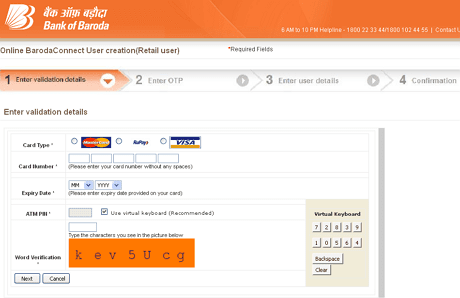
3. It will take you to a new page with title 'Online Baroda Connect User Creation (Retail User)'. This contains the registration form for Bank-of-Baroda net banking.

4. BOB net banking registration is a four-step process. In the first step you have to enter your ATM Card (Debit) details.

bobibanking - bob net banking registration online

5. You'll see a virtual keyboard on the right-side of the screen. For safety use the virtual keyboard. You have to just click on the numbers with the mouse to enter card details.

6. Then click Next and you will be moved on to the second step. An OTP (One Time Password) will be sent to the mobile number you have registered with the account. Now type the OTP on the box provided and hit enter.

7. Third step is for your personal details. You will be asked to choose username and password for net banking account. Make sure your password is difficult enough for others not to guess easily.

8. Once you are done you have to confirm on the final step.

That's it! You have successfully registered online for Bank of Baroda net banking and unique User-ID and Password will be generated for you.

Wait for 24-hours for the account to be activated. And then on you can login to bobibanking.com website and start accessing your BOBI Bank Account online.

For any further assistance contact Bank of Baroda's Helpline 1800 22 33 44/1800 102 44 55 from 6AM - 10PM or reach nearest BOB branch.

That was all about BOB Net Banking Registration Online. I hope now you got a clear idea for registering BOB net banking. If you have any further queries please leave it in the comment section. Also don't forget to share the article in social media.